
Displaying a Variable Product’s Sale Price Range on WooCommerce Archive Pages
Table of Contents
WooCommerce hides discounted variation pricing in shop, category and tag listings. Customers only see the crossed‑out regular price and the discounted value after they choose a specific option. That extra click slows comparison shopping and often harms conversion.
The snippet below rewrites the price markup before WooCommerce renders it in the loop. Instead of the generic range or a single value, the template exposes both the highest and lowest regular prices followed by the corresponding sale range, with the usual <del> and <ins> tags so your theme keeps its visual language.
/**
 * Show full variation price range (regular struck‑through, sale in <ins>)
 * for variable products on archive (shop, category, tag) pages.
 */
add_filter( 'woocommerce_get_price_html', 'pixadoro_variable_price_range_html', 10, 2 );
function pixadoro_variable_price_range_html( $price, $product ) {

    // Process catalogue views only
    if ( ! ( is_shop() || is_product_taxonomy() ) ) {
        return $price;
    }

    // Apply to variable items that are actually on sale (respects schedules)
    if ( ! $product->is_type( 'variable' ) || ! $product->is_on_sale() ) {
        return $price;
    }

    // Fetch extreme values, already formatted for display‑level tax settings
    $min_reg  = $product->get_variation_regular_price( 'min', true );
    $max_reg  = $product->get_variation_regular_price( 'max', true );
    $min_sale = $product->get_variation_sale_price( 'min', true );
    $max_sale = $product->get_variation_sale_price( 'max', true );

    // Build regular span
    $reg_html = ( $min_reg === $max_reg )
        ? wc_price( $min_reg )
        : wc_price( $min_reg ) . ' – ' . wc_price( $max_reg );

    // Build sale span
    $sale_html = ( $min_sale === $max_sale )
        ? wc_price( $min_sale )
        : wc_price( $min_sale ) . ' – ' . wc_price( $max_sale );

    return '<del>' . $reg_html . '</del> <ins>' . $sale_html . '</ins>';
}
How the filter works
woocommerce_get_price_html hands you the raw HTML just before WooCommerce sends it to the template. By replacing that string you sidestep every theme quirk without touching templates. Inside the callback the code checks the current screen, verifies the product type, then harvests the boundary values with built‑in helper methods that already respect tax settings and currency formatting.
Once the function has the four figures it bails out if nothing is actually on sale. Otherwise it prepares two short strings: the regular span, then the sale span. When every variation shares a single price the code prints one value; when they differ it concatenates the extrema with an en dash so shoppers instantly see the spread.
Where to place the snippet
Add it to the bottom of your child theme’s functions.php or drop it into a small must‑use plugin. Flush object caches after deployment so the new markup propagates to every visible product.
Styling tweaks
The snippet leaves the semantics intact—<del> and <ins> are still present—so your existing CSS keeps its job. If your stylesheet targets classes rather than tags, wrap the two values in additional spans or swap the tags entirely.
Performance and compatibility
All calculations rely on WooCommerce’s cached price meta, so there’s no direct hit on query counts. The filter plays nicely with the high‑resolution price caching layered into WooCommerce since version 8.0, and it respects the tax display mode you selected in WooCommerce’s settings.
Keep the callback priority at ten unless another plugin overwrites the same filter. Raise the number if you need to trump a competing adjustment.
Testing the result
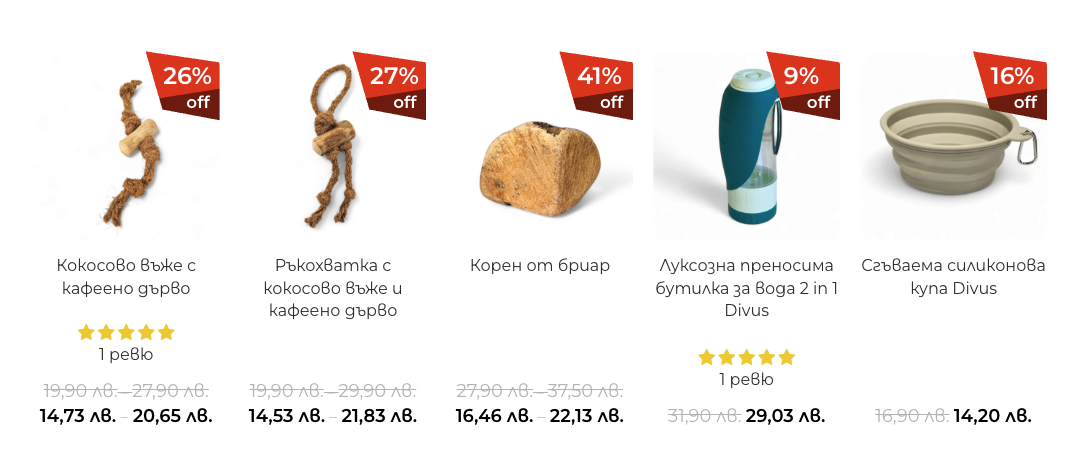
Trigger a catalogue view, clear your browser cache and you’ll now see something like
$99 – $199 $79 – $149
whenever at least one variation carries a discount. Opening the product page still reveals each individual option’s exact price, so the shopper never loses detail.
That small function makes a large difference in transparency. By surfacing the real discount range in the catalogue you highlight variability, improve price signalling and nudge customers one step closer to checkout.


Related Articles
If you enjoyed reading this, then please explore our other articles below:

More Articles
If you enjoyed reading this, then please explore our other articles below:

 2019-2026 ©